
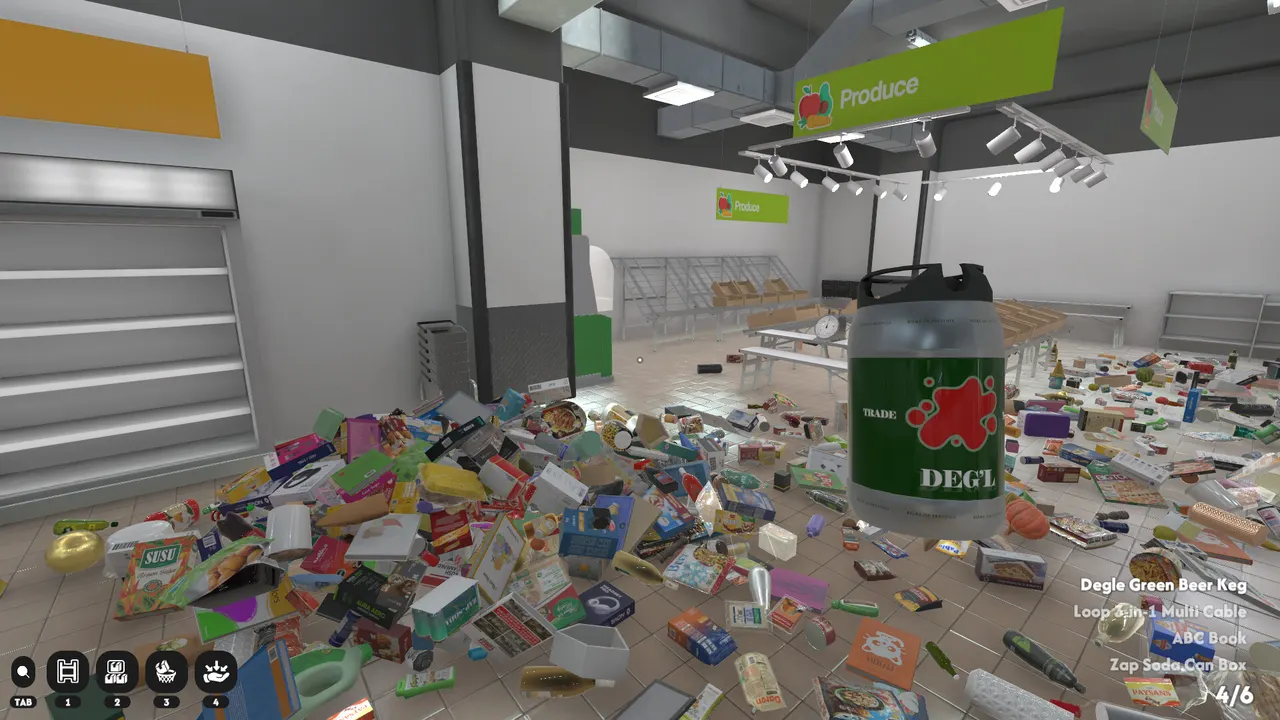
The Sections Hub replaces the old individual section pages. It keeps all confirmed and visible section anchors in one flat page so players can compare cues without opening several short third-level routes. The hub includes categories named by official Steam copy and categories supported by readable Steam screenshots. Additions should stay evidence-driven because wrong section names create bad routes.
How to use this hub
Use these anchors to reduce the store into smaller decisions. Start with the easiest visual families first, then use exact shelf labels for final placement. Do not force every product into this list. If a product does not match any known anchor, place it into a local temporary pile and continue clearing nearby shelves until signs and labels are easier to read. This hub is intentionally narrower than 16 until every remaining section can be verified cleanly from gameplay, first-party copy, or readable media.
Produce
Use the green produce signs as early anchors when the floor is still full of mixed goods. Look for the green overhead sign, open bins, and fresh-food packaging before reading tiny labels. Produce works best as an early cleanup target because fruit-shaped products are visually distinct and removing them lowers floor noise. Do not mix dessert boxes or cereal into this pass just because they use bright colors. Keep uncertain fresh-looking packages near the produce shelves, finish obvious fruit matches first, then compare the remaining labels.
Tea
Tea is one of the named official examples and works best as a calm aisle-by-aisle pass. Tea is easy to lose among other boxy grocery items, so sort it after the biggest floor piles are calmer. Use small shelf labels and drink-adjacent packaging as the first clue, then separate it from bottled drinks before carrying a large stack. Tea can also resemble cereal, sweets, or ramen at a glance. The safer move is to park uncertain boxes near the tea shelf family and resolve exact labels after the row is readable.
Frozen Foods
Frozen items should be routed as a cold-zone problem instead of guessed from package art alone. Treat Frozen Foods as a zone problem. Freezer cases and cold-food packaging matter more than package color, because frozen boxes can share art styles with regular groceries. Do this sweep after a large visual category such as Produce, then carry several cold-zone candidates together. If one package does not fit, do not walk it through every aisle; keep it near the freezer area until surrounding labels make the smaller shelf family clear.
Books
Books are a named section and are easier to isolate because their shapes differ from food boxes. Books should be pulled out of mixed food piles whenever you spot flat covers, school-like labels, or non-food packaging. They are useful cleanup targets because their shapes do not usually need food-aisle guessing. Avoid carrying one book at a time across the store if several flat items are nearby. Make a small non-food pile, clear obvious book matches, then use the remaining shelf labels to separate books from decor or stationery-like products.
Wine
Wine is a named section and recent patch notes changed the wine drawer shape for readability. Wine needs more caution than many food categories because bottle silhouettes overlap with soda, beer, sauces, and cleaning liquids. Patch 1.0.8 changed the wine drawer shape for readability, so use the current shelf shape and label set together. Gather fragile-looking bottles in batches, but do not assume every glass bottle belongs here. Confirm wine labels after the row is visible, especially if the bottle color or shape resembles another aisle.
Ramen
Ramen is a named section with many small packaged items that can disappear into larger piles. Ramen is easier after broad grocery categories are calmer because small cups and packets can hide under larger boxes. Look for instant noodle shapes, bright food packs, and Asian grocery label context. Do not merge ramen with tea or cereal just because the packages are compact. Clear nearby large items first, then sweep for small packets on the floor edges and around shelf bases where they are easy to miss.
Cleaning Goods
Steam screenshots show bleach, soap, toilet cleaner, laundry pads, and similar cleaning shelves. Cleaning Goods should be sorted by function words and container shape, not by color alone. Steam screenshots show bleach, soap, toilet cleaner, laundry pads, and similar shelf labels. This section can be confused with drinks because both use bottles, so check whether the label language points to household cleaning rather than food or beverage. Keep chemical-looking bottles together, then finish exact placement with shelf names and prices.
Bakery and Sweets
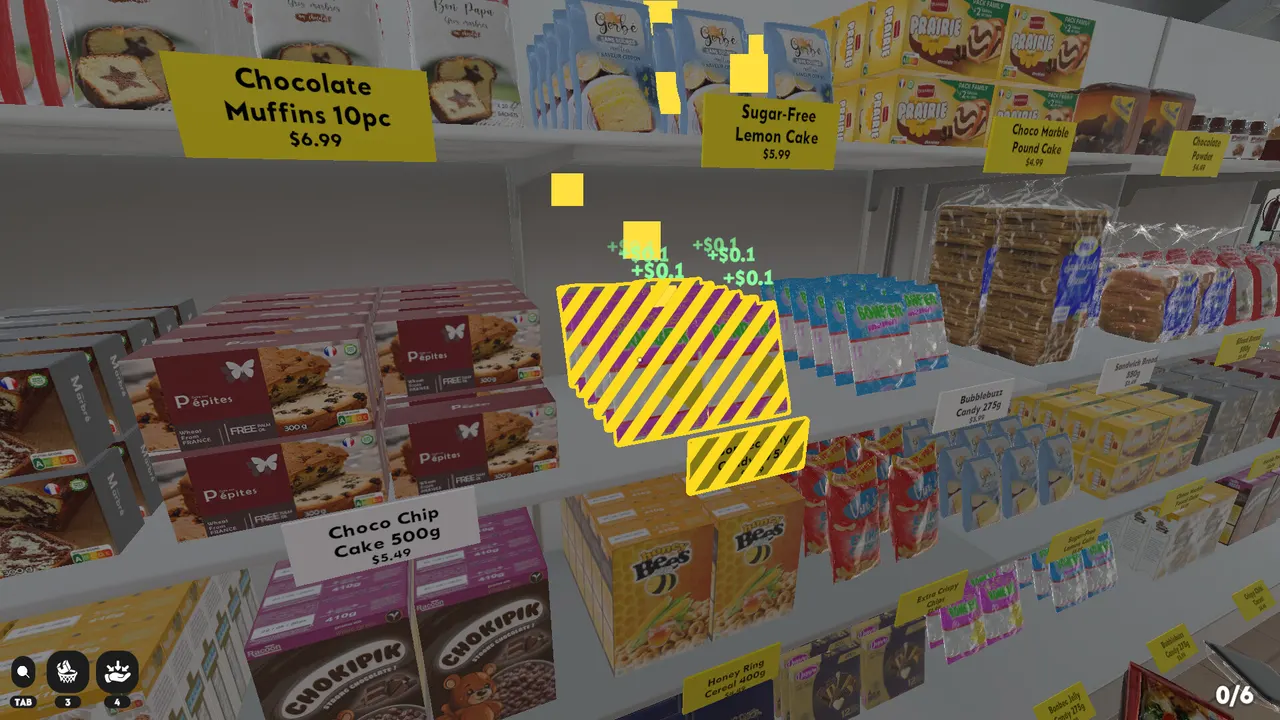
Steam screenshots show muffins, cakes, candy, cereal, and sweet shelf labels packed together. Bakery and Sweets is a high-visual-noise category because muffins, cakes, candy, cereal, and dessert boxes can all use bright packaging. Group dessert-like products near the shelf first, but do not finish placement from art alone. Yellow price tags and readable product labels should decide the final row. If a package feels like both breakfast and dessert, compare it against cereal, bakery, and candy labels before moving on.
Why this is one page
Section advice works better as one page for Supermarket Chaos because the player often needs comparison. Cleaning goods can resemble drink bottles. Tea, ramen, and other boxed goods can blur together. Wine can overlap with other bottle categories until the shelf label is readable. A flat hub keeps those contrasts visible and avoids thin pages that repeat the same sorting rule. If a future update exposes complete section data, the hub can grow without changing the navigation model.
FAQ
Why are there fewer than 16 named anchors?
The Steam page confirms 16 sections, but not every section name is visible from first-party material. The hub starts with confirmed anchors and expands when new reliable data appears.
Can screenshot categories be useful?
Yes, when the sign or shelf labels are readable. Screenshot anchors are useful route clues, but exact placement still depends on the in-game shelf label. They should narrow the search area, not replace exact label matching.